- Microsoft 365: a China aligned group used AI agents and a stolen ConnectWise Cloud Backup (formerly SkyKick) credential to reach Microsoft 365 tenants. MFA did not apply. Check whether that app is authorized in your tenant.
- Websites: two critical PHP flaws (“PHP2Shell”) put WordPress and most other websites at risk. Governments, including Canada and BC, took sites offline to patch. Check your PHP version.
- UK banks: the October 20 outage was a Google Cloud power problem, not an attack.
- Our clients: we do not use SkyKick, our backup partner Axcient was not affected, and Huntress ITDR automatically protected our clients' Microsoft 365 tenants.
Security people have started calling this month “Black October”, and after the last few days it is hard to argue. In the space of a week, artificial intelligence showed up on both sides of the fight: it helped researchers find two critical flaws in software that runs most of the web, and it helped attackers break into Microsoft 365 tenants faster than a human team could.
There is a lot of noise around this, so here is what actually happened, what it means for a small or mid sized organization in Canada, and how to check your own Microsoft 365 tenant and website in a few minutes. Everything below is based on what the vendors, government agencies and researchers involved have published, and we have listed our sources at the end.
1. Microsoft 365 tenants reached through a backup vendor
On October 21, Microsoft published details of a campaign by Storm-0940, a China aligned group it has tracked since 2021. The group used ARTEX, an open source penetration testing tool that hands the work to AI agents: they map a target, look for weaknesses, try credentials and move on to the next step with very little human involvement.
The way in was not Microsoft. It was a third party application. Storm-0940 got hold of a credential belonging to ConnectWise Cloud Backup, the Microsoft 365 backup service previously called SkyKick, and used it to sign in to customer tenants as that application. Because organizations had already granted the backup app broad access to mail, files and the directory, the attackers inherited that access. There was no user sign in, so there was no multifactor authentication prompt to stop them.
What the people investigating it have published:
- Scale. Microsoft says the group attempted to authenticate to more than 2,250 Microsoft 365 tenants. Most attempts failed, but it achieved lasting privileged access at numerous organizations, in some cases less than three hours after first targeting them.
- Confirmed access. Huntress, which first raised the alarm, confirmed unauthorized sign ins in more than 160 tenants. In at least one, a ConnectWise app added itself to the Global Administrator role and then added new secrets to other management applications, which is how an attacker keeps a back door open after the original credential is revoked.
- Microsoft itself was not breached. Microsoft is explicit that the activity “did not result from a compromise of or a vulnerability in Microsoft corporate systems, products, or services.”
- ConnectWise's response. ConnectWise suspended Cloud Backup, SaaS Security and Cloud Management, disabled the affected application identities, and says it has found no evidence that stored backup archives were compromised.
One widely shared figure needs a correction. The “2,900 attempts per minute” in many reports comes from a separate password spraying run against 327 accounts at eight organizations, and Microsoft observed no successful sign ins from it. The tenant access came through the stolen application credential, not through guessed passwords.
Does this affect you? If your organization uses, or has ever used, SkyKick or ConnectWise Cloud Backup, yes: check your tenant now using the steps below, even if you stopped using the service years ago.
Where Regroove's clients stand
We do not use SkyKick. Our Microsoft 365 backup partner is Axcient, which was not affected by this incident.
When we checked our clients' tenants, we did find something worth sharing, because it will be true in plenty of other tenants too. In organizations that had used that backup service at some point in the past, the ConnectWise app was still authorized. Nobody was using it any more, but its permissions had never been taken away. That forgotten access is exactly what this attack depended on, and it is the single most useful thing to look for in your own tenant.
Our clients were protected by Huntress ITDR (identity threat detection and response), which watches their Microsoft 365 tenants around the clock and responded automatically. Huntress is also the company that discovered this attack and raised the alarm for everyone else. I will be blunt about it: if I had budget for a single cybersecurity tool today, it would be Huntress ITDR. You can read how it stopped a breach for one of our clients, and what our ITDR service covers.
2. PHP2Shell: the flaw that took websites offline around the world
On October 21, the PHP project released urgent fixes for two critical vulnerabilities, CVE-2026-109618 and CVE-2026-109619, rated 9.2 out of 10 and nicknamed “PHP2Shell”. They let an attacker run their own code on a web server without logging in. PHP sits underneath WordPress, Drupal, Joomla, Magento and a large share of the web, and the flaws had been there for more than a decade.
They were found by researchers at Wiz and Calif using frontier AI models, which is part of why this month got its nickname. Attackers moved just as fast. Cloudflare saw thousands of attempts before the public announcement and millions afterwards, and Amazon reported that someone appears to have known about the flaws before they were disclosed.
Governments responded by switching things off. Finland, the Netherlands, France, Germany, Belgium, Denmark and others took public websites offline while they patched, and in Japan banks including Mizuho and Shizuoka Bank, MUFG companies and Japan Airlines paused some online services.
It reached Canada too. The Canadian Centre for Cyber Security told organizations to patch immediately and to take internet facing applications offline if they could not. Some Government of Canada websites went offline, the BC government took some of its webpages offline as a precaution. Federal officials said there was no indication that any Government of Canada systems or information had been compromised.
That is worth keeping in perspective. Shutting a site down to patch it is not the same as being hacked. In reporting on October 22, the PHP Foundation said it had not seen evidence of successful exploitation, while security firms were seeing exploitation attempts in the wild. The safe assumption is that any unpatched PHP site on the internet is being probed.
Does this affect you? If you have a website on WordPress or any other PHP platform, yes. We do not host or manage websites for our clients, so this week we audited our clients' sites, told each of them where they stood, and pointed them to their hosting provider to patch. If you have not had that conversation with your host yet, the steps below tell you what to ask.
3. The UK bank outage was not an attack
On October 20, Lloyds, Halifax, HSBC, Revolut and other UK services went down for most of a working day. Coming in the same week, it was easy to assume hackers. It was not: a power problem in Google Cloud's London region took them down together.
Does this affect you? Not directly, but it is a reminder that many organizations quietly depend on the same handful of cloud providers. It is worth knowing which of your critical systems would stop if one provider had a bad day, and what you would do about it.
Why AI makes this month different
The three headline incidents were not the only ones. A few others from this month, all from reputable reporting, show the same pattern:
- AI agents breaking into company websites. Reuters and the security firm NorForge found a criminal using an open source AI agent tool against more than 1,200 websites, reaching sites belonging to more than 100 companies, including Deere, SharkNinja and Cummins. A successful break in took a little under 23 hours on average and, by the researcher's estimate, roughly $50 in AI usage.
- A first in Europe. Spain's data protection authority received what it described as the first breach notification in Spain of an attack allegedly carried out by an AI agent, which found its way into an application, changed personal data and reached invoices.
- AI tools as a target. A malicious version of LiteLLM, a widely used library for connecting software to AI models, was published on October 21 with a credential stealer hidden inside. It was live for about two hours, and anyone who installed it was told to assume their cloud and developer credentials were exposed.
- Closer to home, and not AI at all. About 1.5 million tips submitted to Canadian Crime Stoppers programs over 25 years were reportedly exposed through a third party platform, and police services including Winnipeg suspended their use of it. It is the same lesson as ConnectWise: your data is only as safe as the vendors that hold it.
It is worth being measured about what this means. The experts closest to it are not describing rogue AI. As Dan Guido of Trail of Bits put it, “AI accelerates exploit development. Knowing how to turn a bug into a shell still takes expertise.” What AI changes is speed and scale: old, forgotten and unpatched things are now found and tried far faster than before. That makes the unglamorous basics, patching, removing access nobody uses, and watching your identities, more important than ever.
How to check your Microsoft 365 tenant
You need a Microsoft 365 administrator account for these steps. They follow the guidance published by Microsoft and Huntress.
- Sign in to the Microsoft Entra admin center at entra.microsoft.com, and open Enterprise applications (under Entra ID in the left menu).
- Search by Application ID, not by name, for each of the IDs in the table below. Older tenants may list them as “SkyKick Cloud Manager”. If nothing comes back for any of them, the ConnectWise apps are not authorized in your tenant.
- If one appears, open it, go to Properties, set Enabled for users to sign in? to No, and select Save. Disable it rather than deleting it, so the evidence is preserved. Huntress's advice is to disable it “even if you see nothing unusual.”
- Go to Sign-in logs (under Monitoring), switch to the Service principal sign-ins tab, and filter by the application ID. The normal user sign ins tab will not show this activity. Look for sign ins from IP addresses outside Microsoft's ranges, especially 144.172.64.128, from October 15 onwards.
- Go to Audit logs and look for Add member to role, Add service principal credentials and Update application events since October 13 that you did not make yourself.
- Check the Global Administrator role for any application you did not put there, and check your other management and security apps for client secrets or certificates you did not create.
| Application ID | Application |
|---|---|
506e08f9-6e9a-4da4-942b-a099a03644ae | ConnectWise Cloud Backup (formerly SkyKick) |
2399d300-6fca-4e6a-a686-399fefe75b83 | ConnectWise Cloud Management |
24205314-2b89-4e07-a2a4-579e898a5640 | ConnectWise Cloud Management, MS Teams |
b78f6a77-d4e5-46fb-87e5-d1648bd02519 | ConnectWise Cloud Management, Exchange Online |
0de14c77-b9b0-4137-9360-34878a929827 | ConnectWise Cloud Management, MS Graph |
412dcf96-176d-4b3a-a1b0-4981ad66971e | ConnectWise Cloud Management, Partner Center |
b2b55f5b-7758-4719-8d8f-88ae172e6bdb | ConnectWise Cloud Management, SharePoint Online |
Microsoft and Huntress both stress that a clean result does not prove nothing happened, because some directory reads leave no audit trail. If you find the app with activity you cannot explain, treat it as an incident and get help before you start removing things.
While you are in there: scroll through the full list of Enterprise applications and ask of each one, “do we still use this?” Every app you no longer use but have not removed is standing access someone could inherit.
How to check your website
Everything comes down to one question: which PHP version is your website running, and has it been patched? These are the fixed versions.
| PHP branch | Patched from |
|---|---|
| 8.5 | 8.5.12 |
| 8.4 | 8.4.27 |
| 8.3 | 8.3.36 |
| 8.2 | 8.2.35 |
| 8.1 and older | No official fix. Upgrade, or use a vendor supplied patched package |
Two things trip people up. First, Linux distributions and hosting companies often backport the fix into their own packages without changing the version number, so an older number is not always unpatched; your host or the package changelog is the final word. Second, updating PHP is not enough on its own: every PHP process has to be restarted before the fix takes effect. PHP itself says no configuration change fully mitigates these flaws, so updating is the only real fix.
WordPress
- Log in to your WordPress dashboard as an administrator.
- Go to Tools, then Site Health, then the Info tab.
- Expand Server and read the PHP version line.
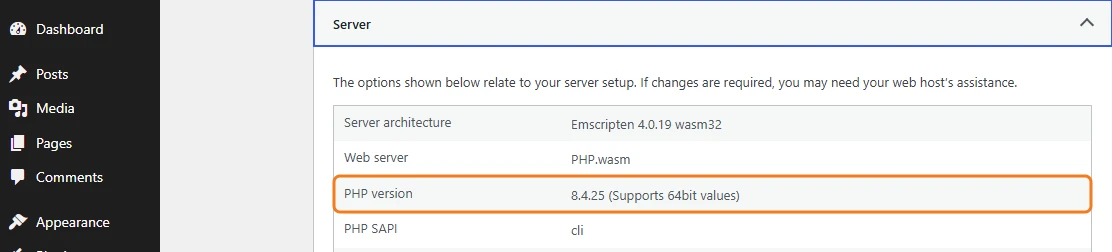
If your site is with a hosting company, which is the case for most small businesses, send them this question: “Has the PHP on our site been patched for CVE-2026-109618 and CVE-2026-109619, and have the PHP processes been restarted?” Many hosts also show the PHP version in their control panel, for example under MultiPHP Manager in cPanel.
Any server: the phpinfo page
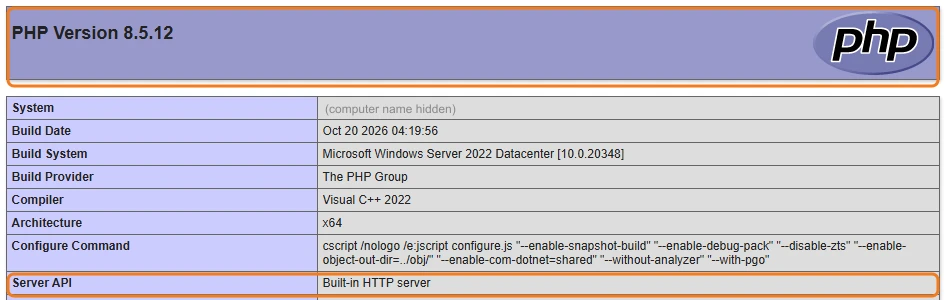
On any server, Apache, LiteSpeed or IIS, the quickest way to see which PHP your website is actually using is a phpinfo page:
- Create a file called
info.phpin the website's root folder containing only<?php phpinfo(); - Open it in a browser at your site's address followed by
/info.php. - Read the version in the banner at the top, and the Server API line, which tells you how PHP is running.
- Delete the file immediately afterwards. It reveals a lot about your server to anyone who finds it.
Apache
Apache runs PHP either as a module (mod_php, which PHP considers the highest risk setup) or through PHP-FPM. On the server, these commands show what is installed:
# Which PHP the command line uses
php -v

# Is PHP loaded into Apache as a module?
apachectl -M | grep -i php

# Debian or Ubuntu: installed PHP packages
apt list --installed 2>/dev/null | grep -E "^(php|libapache2-mod-php)"

# Red Hat, Rocky or Alma: installed PHP packages
rpm -qa | grep -i php
The command line PHP is not always the one your website uses, which is why the phpinfo page above is the more reliable check. After updating, restart both Apache and PHP-FPM, for example sudo systemctl restart apache2 php8.3-fpm on Ubuntu, adjusting the names to your version.
LiteSpeed
LiteSpeed uses its own PHP builds, called LSPHP, kept separately from the system PHP. On the server:
# List the LSPHP versions installed
ls /usr/local/lsws/ | grep lsphp

# Check a specific one, for example 8.3
/usr/local/lsws/lsphp83/bin/php -v

# On cPanel servers with CloudLinux, PHP versions may live here instead
/opt/alt/php83/usr/bin/php -v
Paths vary between control panels, so if the commands above find nothing, the phpinfo page is the dependable check. After updating, restart LiteSpeed so it starts fresh PHP processes: sudo systemctl restart lsws.
IIS (Windows Server)
- Open IIS Manager, select your website, and open Handler Mappings.
- Find the PHP entry (often called PHP_via_FastCGI). Its path shows which
php-cgi.exethe site uses. - Open a command prompt in that folder and run
php-cgi -v.
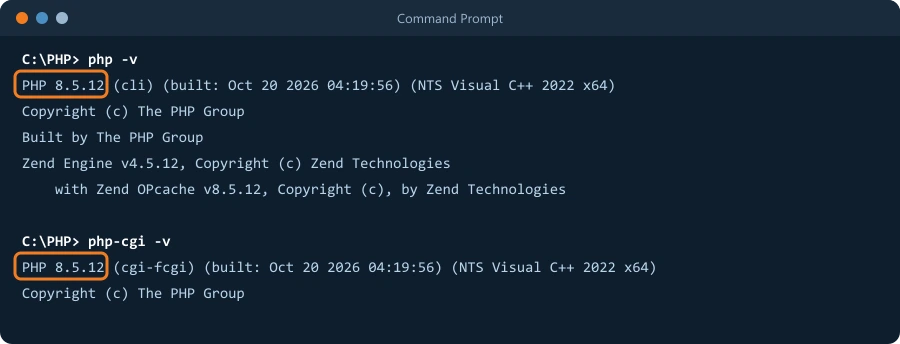
To update, download the matching non thread safe (NTS) build from windows.php.net, replace the contents of the PHP folder while keeping your php.ini, and restart IIS with iisreset or recycle the site's application pool.
If you cannot patch right away
Follow the Canadian Centre for Cyber Security's advice: take the site off the internet, or restrict who can reach it, until it is patched. A few hours offline is far cheaper than cleaning up after a compromise.
How we can help
If your organization is on a support agreement with us, our team is already on this. If you are not, we are happy to help you check your tenant and talk to your web host. Our managed security services and ITDR service are built for exactly this kind of week, and our backup and disaster recovery work is built on Axcient.
Frequently asked questions
What is Black October?
It is the informal name security researchers and the press have given to a run of serious incidents in October 2026, in which artificial intelligence played a part on both sides. AI helped researchers find two critical flaws in PHP that had gone unnoticed for more than a decade, and attackers used AI agents to break into Microsoft 365 tenants and company websites at a speed and scale that used to need a team of people. It is not one coordinated attack.
Did multifactor authentication protect against the ConnectWise attack?
No, and that is the important lesson. The attackers did not sign in as a person. They signed in as a trusted backup application that organizations had already approved, using its stolen credential, so there was no user and no MFA prompt involved. Protecting against this kind of attack means reviewing which applications you have authorized in Microsoft 365, and watching what those applications do.
Is my website affected by the PHP vulnerabilities?
If your website runs on PHP, which includes every WordPress, Drupal, Joomla and Magento site, it is affected until PHP is updated to 8.5.12, 8.4.27, 8.3.36 or 8.2.35, or until your host confirms a patched package. PHP 8.1 and older receive no official fix. Most small businesses do not manage this themselves: their hosting company does, so the first step is to ask your host directly whether your site is patched.
Were Canadian organizations affected?
Yes. The Canadian Centre for Cyber Security told organizations to patch PHP immediately and take unpatched sites offline. Some Government of Canada websites and some BC government webpages went offline as a precaution. Federal officials said there was no indication that any Government of Canada systems or information had been compromised.
Was the UK banking outage a cyberattack?
No. The outage that hit Lloyds, Halifax, HSBC, Revolut and others on October 20 was caused by a power problem in Google Cloud's London region, not by hackers. It is still a useful lesson about how many organizations depend on the same few cloud providers.
Sources
- Microsoft Security blog: AI driven, large scale nation state campaign using ARTEX enables supply chain compromise
- Huntress: ConnectWise (SkyKick) vendor credentials abused in Microsoft 365 attacks
- Help Net Security: ConnectWise suspends Cloud Backup service
- The Hacker News: Compromised ConnectWise credential used against 173 Microsoft 365 tenants
- Help Net Security: PHP2Shell, critical PHP vulnerabilities patched
- watchTowr: PHP2Shell FAQ, affected versions and fixes
- Bloomberg via Claims Journal: Critical PHP flaws spur global patch effort, temporary shutdowns
- Global News: Ottawa taking down some federal websites over critical global vulnerability
- Global News: No indication of Canadian data compromised by global PHP issue
- CBC News: Canadian government sites among those offline after flaw identified
- CNBC: AI’s Black October, critical PHP flaws set off global security scramble
- 404 Media: AI is changing everything about hacking
- The Hacker News: Hackers use autonomous AI agents to breach company websites
- DLA Piper: First AI agent data breach notification, what it means for incident response
- Datadog Security Labs: LiteLLM compromised on PyPI and Docker
- Global News: Winnipeg police suspend Crime Stoppers tips following data breach
- AP via ABC News: Google Cloud outage hits UK banks
 Author: Helio Pereira