- One card for every vendor is a security risk. If your card details are compromised, multiple subscriptions and payments can be affected.
- Virtual cards help reduce that risk. Give each vendor its own card with spending limits and individual controls.
- It’s the principle of least privilege applied to payments. One compromised card shouldn’t affect your entire business.
- We’re sharing what works for us. We’re an IT company, not financial advisors. We use Ramp as one example, but we’re recommending the security approach, not endorsing the provider.
How a mystery charge changed how we pay
For years we paid for everything with one company credit card. Domains, Microsoft 365, software subscriptions, cloud services and the phone system all sat on the same number.
Then one day a charge appeared on the statement that none of us had made. It was not a large amount, but that did not matter. The card was compromised, so we cancelled it and the bank sent a new one. That was the easy part.
The hard part came next. We had to work out every service that card was registered with, sign in to each one, and enter the new card details, one vendor at a time. Anything we missed would fail at its next renewal, and some of those renewals were the services that keep our business online. It took far longer than it should have, and we were never completely sure we had found everything.
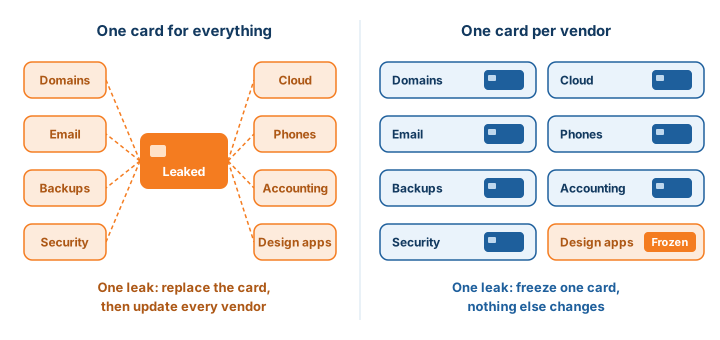
So we asked ourselves a simple question: what if every service had its own card? If GoDaddy costs us about $50 a month, why not give GoDaddy a card that only works at GoDaddy, with a limit close to $50? If our Microsoft bill is $300 a month, give Microsoft its own card with its own limit. If one of those numbers ever leaks, the damage stops at one vendor, and we replace one card instead of all of them.
That is exactly what virtual cards do. We moved our own payments over, and this post explains why we see it as a cybersecurity decision as much as a finance one.
Why payment details are a security problem
We look at payments the way we look at everything else in IT: as something an attacker can use. A card number saved with a vendor is a credential. It sits in that vendor’s systems, in browsers and password managers, and sometimes in old emails and chat threads. Any of those can leak: a vendor gets breached, a laptop gets infected, someone shares the number to get a purchase done quickly. When one number pays for everything, any one of those leaks puts everything at risk.
We apply the principle of least privilege to accounts: nobody gets the global admin password just because it is convenient. A single shared card is the opposite. It is one key that opens every door, handed to anyone who needs to buy something.
So we changed how we pay internally. A separate virtual card for each vendor does not stop fraud and cannot guarantee a number never leaks, but it limits the damage when one does: a compromised card affects one service instead of all of them. We currently use Ramp for this. It works for us, but it is not necessarily the right platform for every business, and the practice matters more than the provider.
What the shared card looks like from the help desk
Most businesses file card problems under finance. From where we sit, answering the support line, they show up as IT problems. These are the kinds of requests a shared company card produces. If you run a business, you have probably made at least one of them.
None of these are unusual. They all come from one payment method serving dozens of unrelated services.
How virtual cards fix it
A virtual card is a real card number, with its own expiry date and security code, that exists only in an app. Spend management platforms let a business create as many as it needs. Instead of one card for everything, you create one card per vendor, per subscription or per employee, and each one carries its own rules.
- Locked to one merchant. A card can be restricted to a single vendor. If the number leaks, it is useless anywhere else: the card made for your Microsoft 365 renewal simply declines at an online electronics store.
- Its own limit. A monthly or per transaction cap that matches the expected charge. A card for a $200 a month subscription cannot be used for a $5,000 purchase.
- An end date. A card for a one time purchase or a software trial can lock itself on a date you choose, so the vendor cannot keep billing after the trial ends.
- Freeze or cancel in seconds. If a vendor is breached or you stop using a service, you shut down that one card and nothing else changes.
- Company wide merchant rules. You can block a merchant, or a whole category of merchants, across every card in the organization.
Least privilege for payments: why IT should care
We approach payment cards the same way we approach identity and access. You would never give every employee the global admin password, and you should not give every employee the same card number. Virtual cards bring least privilege to spending, and that changes how an IT team can support you.
Every vendor gets a card, so every vendor gets documented
When there is a card named “Microsoft 365” or “Domains and DNS”, the payment method, the owner and the service are tied together. That map belongs in your IT documentation, and it lets your IT provider act quickly when something renews, fails or needs to move.
A leak stays contained
A breach at one software vendor exposes one card. Cancel it, issue a new one for that vendor, and nothing else is affected: no wave of declined renewals, and no weekend spent updating payment details everywhere.
Nobody needs to share a number
When each person has their own cards with their own limits, there is no reason to paste a card number into a chat or an email. The request becomes “create a card for this vendor” instead of “send me the number”.
Onboarding and offboarding become complete
We already create and remove accounts, licences and devices when people join or leave. Cards belong on the same checklist. Cancel a departing person’s cards and any subscription tied to them shows up straight away, instead of six months later on a statement.
Critical services keep renewing
Domains, DNS, certificates, backups, security tools and phone systems each get a dedicated card with comfortable headroom above the usual charge. These cards do not change when someone loses a wallet, so the services that keep you online never depend on someone remembering to update a payment method.
Shadow IT becomes visible
A new tool can only be paid for with a card someone had to create, name and approve. That gives you a real inventory of the software in use, which is the starting point for licence management, security reviews and getting rid of duplicate tools.
Less admin as a bonus
The finance side improves too. Transactions are captured as they happen and sync to accounting software; Ramp’s Canadian version connects to QuickBooks Online, Xero and Microsoft Dynamics 365 Business Central. Because each vendor has its own card, coding expenses is close to automatic, and month end goes faster.
What we use, and what is available in Canada
We use Ramp. Until recently most of these platforms were only available in the United States. Ramp launched in Canada on July 28, 2026, with Visa cards in Canadian and US dollars issued through Peoples Trust Company, and automatic GST, HST, PST and QST coding. Paying for US priced software with a US dollar card can also avoid the foreign exchange fee most Canadian cards add to US dollar charges.
It is not for every business. According to Ramp’s own eligibility rules at the time of writing:
- It is not available to businesses in Quebec, Saskatchewan or the territories.
- The business must be a corporation registered in Canada. Sole proprietorships and partnerships are not eligible.
- Connected bank accounts need a balance of at least CA$75,000, and meeting that does not guarantee approval.
- Some industries are restricted.
If Ramp does not fit, Canadian platforms such as Float and Venn offer unlimited virtual cards in Canadian and US dollars. Compare fees, how each card is paid off, approval rules and accounting connections, and confirm the details with each provider. The platform matters less than the approach: one card per vendor, each with its own limit.
Where to start
If your business still runs everything through one or two shared cards, this is the path we would follow.
- List your recurring charges. Pull the last few months of statements and write down every vendor and subscription. Flag anything nobody can explain.
- Mark your critical services. Domains, DNS, email, certificates, backups, security tools and phone systems go to the top of the list.
- Choose a platform. Compare options against your currencies, accounting system and approval process, and ask your accountant how it fits your books.
- Create one card per vendor. Lock each card to its merchant, set a limit close to the expected charge with room for tax and price changes, and give it a clear name.
- Move renewals over gradually. Update payment details vendor by vendor, starting with critical services, and record each card and its owner in your IT documentation.
- Retire the shared card. Once everything has moved, cancel the old card so it cannot be misused.
- Add cards to onboarding and offboarding. Treat them like any other access your IT team manages.
The bottom line
A shared company card is a single point of failure for your technology and a security gap hiding in plain sight. We learned that the slow way, one vendor sign in at a time. Virtual cards locked to one vendor, each with its own limit, help contain a leak to one service, keep critical renewals from lapsing, and show you exactly what you are paying for.
How Regroove helps
We do not sell cards or set up finance platforms. We handle the IT side: reviewing your software and subscriptions through our software procurement service, documenting which services are critical and who owns them, and building payment access into onboarding and offboarding alongside accounts and devices as part of our managed security services. If you want help cleaning up subscriptions or working out what you are really paying for, get in touch.
Frequently asked questions
Are virtual credit cards safer than a regular company card?
They limit the damage when something goes wrong. A virtual card locked to one vendor with its own limit is useless anywhere else if the number leaks, and you can cancel it without touching any other service. It does not stop a vendor from being breached, but it keeps one breach from becoming a problem for your whole business.
What limit should each vendor card have?
Close to the expected charge, with some room for tax, price increases and added licences. If your Microsoft bill is about $300 a month, a limit a little above that stops misuse without declining a normal renewal. Give critical services such as domains and backups more headroom, because a declined renewal there can take you offline.
Do I need Ramp to use virtual cards?
No. Ramp is the platform we use, but Canadian platforms such as Float and Venn also offer unlimited virtual cards in Canadian and US dollars. What matters is one card per vendor with its own limit, whichever provider you choose.
Is this financial advice?
No. It explains how we, an IT company, set up our own payments and why we treat that as a security decision. We are Ramp customers, not affiliates. Check fees, eligibility and terms with each provider, and talk to your accountant before changing how your business pays for things.
Not financial, tax, or legal advice. Regroove is an IT services company sharing its own experience for informational purposes only. We recommend considering vendor-specific virtual cards as a security practice, not any particular financial services provider. Consult qualified professionals before making financial or business decisions.
No endorsement or guarantees. References to Ramp, Float, Venn, or other providers do not constitute an endorsement or guarantee of their security, reliability, service quality, financial stability, or suitability. We have not independently audited these providers. Virtual cards may reduce certain risks but do not eliminate fraud or financial losses. Third-party services are governed by their own terms, and Regroove does not control their operations or performance.
Referral disclosure. We use Ramp and may receive a referral reward if you sign up through our link. You may also qualify for a promotional benefit, subject to Ramp’s terms. Ramp did not sponsor, pay for, or review this article. Referral benefits do not imply our endorsement or guarantee of its services. Readers should independently evaluate any provider before signing up.
Sources
- Ramp support: applying for Ramp as a Canadian business
- Ramp: corporate cards in Canada
- Fintech.ca: Ramp brings its finance platform to Canada (July 28, 2026)
- Ramp support: setting up controls on Ramp cards and funds
- Ramp support: automatically lock cards and funds
- Ramp: announcing merchant restrictions
- Ramp support: customer referrals
- Float: corporate cards
- Venn: virtual credit cards for Canadian businesses
 Author: Clod Feijao