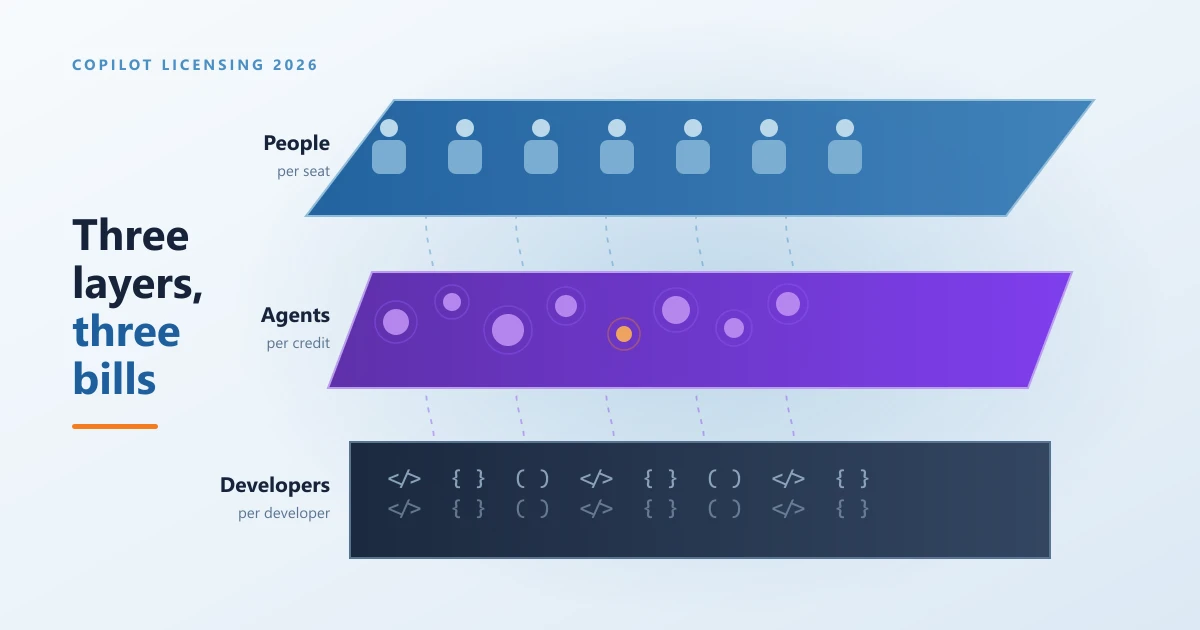
Copilot licensing has changed more times in three years than most Microsoft products change in a decade. It arrived as a single expensive add on for large enterprises, then opened up to smaller organizations, then picked up a free chat tier, then grew a whole family of agents with their own billing model, and somewhere along the way it stopped being one product and became a stack of them. Almost every guide written about Copilot pricing is now wrong in at least one important way, including the ones we published ourselves earlier in the year.
So this is a reset. Everything below reflects Microsoft and GitHub pricing as it stands at the end of August 2026, in Canadian dollars, with the prerequisites spelled out for each piece. The aim is to give you one page you can send to a finance lead, an IT manager or a business owner and have all three of them come away understanding what they would actually be buying.
The single most useful idea to hold onto is this: Copilot is no longer one purchase. It is three separate layers, and each layer is bought a different way. There is the layer your ordinary staff use, the layer where agents do work on your behalf, and the layer your developers work in. Mixing them up is where budgets go wrong.
Layer one: licensing Copilot for the people who work for you
This is the layer nearly everyone means when they say Copilot. It is the assistant sitting inside Word, Excel, Outlook, PowerPoint and Teams, and it is bought the same familiar way as any other Microsoft 365 seat: one licence, one person, one monthly price.
The first thing worth knowing is that you may already have a version of it. Microsoft 365 Copilot Chat is included at no extra cost with most eligible Microsoft 365 plans. Your staff get a secure chat assistant with commercial data protection, so what they type does not leak into public model training, and they can upload a file and ask questions about it. If nobody in your organization has tried Copilot yet, this is where to start, because it costs nothing and it tells you very quickly who in your team is inclined to use this kind of tool at all.
What Copilot Chat cannot do is reach into your own information. It does not know what was decided in last Tuesday's Teams meeting, it cannot summarise the mailbox thread you were copied into, and it cannot pull the numbers out of the workbook sitting in your finance SharePoint site. That grounding in your own content is precisely what the paid licence buys, and it is the difference between a clever chatbot and something that genuinely saves an hour.
For organizations up to 300 users, the paid option is Microsoft 365 Copilot Business. It lists at CAD $28.50 per user per month on an annual term, and Microsoft is running a promotional rate of CAD $24.43 per user per month until September 30, 2026. Month to month billing costs CAD $34.20 with no promotional rate. It is an add on, so it needs a qualifying Microsoft 365 Business plan underneath it, and the 300 user ceiling is a hard limit on the tenant rather than a guideline.
Above 300 users, or on any enterprise plan, the product is Microsoft 365 Copilot at CAD $40.70 per user per month on an annual term, with no seat ceiling. It sits on top of an enterprise base plan such as Microsoft 365 E3 or E5.
Microsoft also sells bundles where the base plan and Copilot arrive as one line item, which usually works out cheaper than assembling the two yourself. Microsoft 365 Business Standard with Copilot is CAD $31.90 per user per month annually, and Business Premium with Copilot is CAD $43.40. At the top end, Microsoft 365 E7 is CAD $134.30 and packages E5, Copilot, Agent 365 and the Entra identity suite together.
Notice what that chart makes obvious. The Copilot add on is rarely the expensive part. An enterprise Copilot seat adds CAD $40.70, but the E5 licence underneath it costs twice that. If you are being quoted a Copilot rollout and the conversation has only been about the Copilot line, half the budget has not been discussed yet.
Layer two: licensing agents, Copilot Studio and Copilot Cowork
An agent, in plain terms, is Copilot with a job description. Instead of waiting for someone to ask it a question, an agent is given a defined task, a set of instructions, permission to reach certain information and sometimes permission to take action. A support agent that answers common staff questions from your policy library is an agent. So is something that reads incoming supplier invoices and files them correctly.
Agents are where the licensing model changes shape completely, and this is the part that surprises finance teams. Agents are not bought by the seat. They are bought by consumption, using a unit Microsoft calls a Copilot Credit. You are effectively paying for how hard the agent works rather than how many people it works for, which behaves much more like a utility bill than a software subscription.
Copilot Studio is the tool you build agents in. There is no per user fee to build, so a whole team can create and manage agents without buying maker licences. What you pay for is what the agents consume once they are running. Microsoft sells Copilot Credits in capacity packs of 25,000 credits at CAD $271.40 per pack per month, or on a pay as you go meter where you pay only for what was used at the end of the billing period. Prepaying can save up to twenty percent, and unused credits in a monthly pack do not roll over. The pay as you go route requires an Azure subscription to bill against.
Copilot Cowork is the newest and least understood piece. It became generally available on June 16, 2026, and it exists for long jobs rather than quick answers. Cowork can run through many steps, call several tools, work across your Microsoft 365 applications and hand back a finished piece of work rather than a first draft. There is no Cowork licence to buy, which trips people up. It requires an active Microsoft 365 Copilot licence and then bills its own consumption in Copilot Credits at about one cent per credit on the pay as you go rate.
Two details about Cowork matter more than the price. It is switched off by default, and administrators can set spending limits at the tenant, group and individual level. If you take one operational instruction from this entire article, make it this one: set those limits before you enable it, not after the first invoice.
Agent 365 is the governance layer, and it answers a question that becomes urgent the moment you have more than a couple of agents running. Who owns this thing, what is it allowed to see, and what did it actually do? Agent 365 gives every agent an identity, applies security and compliance policy to it and produces an audit trail, treating agents much like staff accounts. It costs CAD $20.40 per user per month on an annual term and is included in Microsoft 365 E7.
The important and frequently misread detail is that Agent 365 is licensed per person, not per agent. One licence covers every agent that person owns, sponsors, manages or interacts with, so deploying more agents does not increase the licence count. Microsoft expects the licence to cover the population of people who work with agents, which in practice grows quickly once agents are embedded in everyday processes. Agent 365 also requires a qualifying base plan underneath, typically Microsoft 365 E5, or E3 with the Defender and Purview suites added, or Business Premium for smaller organizations.
Layer three: licensing GitHub Copilot for developers
If your organization writes software, this is a completely separate purchase with its own billing, its own admin console and its own invoice. GitHub Copilot is not part of your Microsoft 365 agreement, it is not covered by a Microsoft 365 Copilot licence, and buying one has no effect on the other. Plenty of finance teams have been surprised by that, so it is worth stating plainly.
For individuals there are four tiers. Free costs nothing and gives a limited monthly allowance of completions and chat requests. Pro is USD $10 per month. Pro Plus is USD $39 per month. Max is USD $100 per month and exists for developers running sustained agent driven work.
For organizations there are two. GitHub Copilot Business is USD $19 per user per month and GitHub Copilot Enterprise is USD $39 per user per month. Both include a monthly allowance of AI credits matching the seat price, and both add the things a business actually needs: policy controls, organization wide management and intellectual property indemnity.
On June 1, 2026 GitHub moved its paid plans to usage based billing with AI credits, priced at one cent per credit. The reassuring detail is that ordinary code completions and next edit suggestions remain included and do not consume credits. What draws down credits is the heavier work: chat, code review and autonomous agent tasks. For most teams the included allowance covers normal use, and only the genuinely heavy users go beyond it.
One practical note for Canadian buyers. GitHub prices in US dollars, unlike every Microsoft 365 figure in this article. At an exchange rate of roughly 1.39, a Copilot Business seat lands near CAD $26 and an Enterprise seat near CAD $54, but that number moves with the currency and is not a rate you can lock in.
Choosing what to actually buy
The pattern that works for most organizations is boring and effective. Start with Copilot Chat, because it is already included and it costs you nothing to find out who cares. Then buy a small block of paid Copilot licences, ten or fifteen, and give them to the people whose work is genuinely full of writing, summarising, meeting follow up and analysis. Leave them for a quarter and ask honestly whether those people would give the licence back.
Only after that does the agent layer make sense, because agents are worth building when you have found a repetitive process that eats real hours, not before. And Agent 365 becomes necessary at the point where agents stop being a pilot and start touching customer data or financial records, which is usually sooner than anyone plans for.
There is one piece of preparation that matters more than any licensing decision on this page. Copilot never creates new access. It only uses the access a person already has. That sounds reassuring until you remember the SharePoint site somebody shared with the whole organization in 2019, or the folder of salary information that was only ever protected by nobody knowing the link. Copilot makes that content trivially easy to find. Our Copilot data readiness checklist walks through the review, and it is worth an hour before the licences arrive rather than a difficult conversation after.
Why buying Copilot through a partner beats buying it direct
Here is the part most people assume works differently than it does. Buying your Microsoft licences through a partner such as Regroove does not cost more. It is the same Microsoft licence at the same Microsoft price. There is no partner markup, no bundled fee and no minimum you have to hit. Microsoft pays the partner, not you.
So the question is not whether you want to pay extra for help. You do not. The question is whether you would rather have the help or not have it, at the same price.
What changes is everything around the licence. When you buy direct, you are buying a product. When you buy through a partner, somebody is accountable for whether it works.
Somebody checks whether you need what you are buying. Copilot is expensive enough that buying it for everybody is a common and costly mistake. We look at what people actually do before agreeing on a number, and we will tell you when the answer is fewer licences than you asked for. That is an awkward conversation for a reseller paid on volume and a normal one for a partner paid to be useful.
Renewals stop being a surprise. Annual terms renew automatically, promotional pricing expires quietly, and the September 30, 2026 date on the current Copilot Business promotion is exactly the sort of thing that passes unnoticed. We keep a renewal calendar so nothing auto renews at a number nobody agreed to.
The readiness work is included in the thinking. A Copilot licence delivered into a tenant with messy permissions produces an incident, not a productivity gain. Buying through a partner means the permission review, the pilot group and the rollout plan are part of the same conversation as the purchase instead of something you discover you needed afterwards.
Support comes from people who know your tenant. When something breaks, you are talking to a team that configured your environment and remembers why it is set up the way it is, rather than opening a ticket and explaining your organization from scratch.
Credit based billing gets watched. The agent layer is the genuinely new financial risk in Copilot, because consumption billing can run away quietly. Spending limits, alerts and someone actually reading the usage reports are the difference between a predictable bill and an unpleasant one.
Regroove has been a Microsoft partner since 2001 and holds the Microsoft Solutions Partner designation in Modern Work, which is awarded on demonstrated customer outcomes rather than on sales volume. Our managed services team handles licensing and renewals as part of the ongoing relationship, and our Microsoft 365 practice does the tenant work that decides whether any of this actually lands.
Every Copilot price in one table
| Product | Price | You also need |
|---|---|---|
| Microsoft 365 Copilot Chat | Included | An eligible Microsoft 365 plan |
| Microsoft 365 Copilot Business | CAD $28.50 per user monthly, annual term. CAD $24.43 promotional until September 30, 2026. CAD $34.20 month to month | A Business Basic, Standard or Premium plan. Capped at 300 users |
| Business Standard with Copilot | CAD $31.90 per user monthly, annual term | Nothing, the base plan is included |
| Business Premium with Copilot | CAD $43.40 per user monthly, annual term | Nothing, the base plan is included |
| Microsoft 365 Copilot for enterprise | CAD $40.70 per user monthly, annual term | An enterprise base plan such as E3 or E5 |
| Microsoft 365 E7 | CAD $134.30 per user monthly, annual term | Nothing. Bundles E5, Copilot, Agent 365 and the Entra suite |
| Agent 365 | CAD $20.40 per user monthly, annual term | E5, or E3 with Defender and Purview, or Business Premium |
| Copilot Studio credits | CAD $271.40 per pack of 25,000 credits monthly, or pay as you go | An Azure subscription for the pay as you go meter |
| Copilot Cowork | No licence. Billed by consumption at about one cent per credit | An active Microsoft 365 Copilot licence |
| GitHub Copilot Pro | USD $10 per month | A GitHub account |
| GitHub Copilot Pro Plus | USD $39 per month | A GitHub account |
| GitHub Copilot Business | USD $19 per user monthly, includes USD $19 in AI credits | A GitHub organization |
| GitHub Copilot Enterprise | USD $39 per user monthly, includes USD $39 in AI credits | A GitHub Enterprise Cloud organization |
The short version
Copilot is three purchases wearing one name. Your staff are licensed per seat, and the base Microsoft 365 plan underneath usually costs more than the Copilot line everyone is looking at. Your agents are billed by consumption in credits, which behaves like a utility rather than a subscription and needs spending limits set before anyone switches them on. Your developers are on GitHub Copilot, priced in US dollars, on a separate invoice that has nothing to do with the rest.
Start with the free chat tier, buy a small number of paid seats for the people who will genuinely use them, sort out your file permissions before the licences land, and only move into agents when you have found a process worth automating. Everything after that is a question of watching the numbers, which is considerably easier when someone is being paid to watch them with you.
Prices in this article are Microsoft Canada and GitHub list pricing as published at the end of August 2026 and exclude tax. This part of the Microsoft catalogue changes often, so treat any figure older than a quarter with suspicion, including this one. If you want the current numbers for your own tenant rather than list pricing, get in touch and we will put them together with you.
Frequently asked questions
How much does Microsoft 365 Copilot cost in Canada in 2026?
It depends which family you are in. Microsoft 365 Copilot Business, the plan for organizations up to 300 users, is CAD $28.50 per user per month on an annual term, currently discounted to CAD $24.43 until September 30, 2026. Microsoft 365 Copilot for enterprise customers is CAD $40.70 per user per month on an annual term. Both are add on licences, so you also need a qualifying Microsoft 365 plan underneath, and that base plan is where most of the real cost sits.
Is there a free version of Copilot for business?
Yes. Microsoft 365 Copilot Chat is included at no extra cost with most eligible Microsoft 365 plans. It gives your staff a secure, web grounded chat assistant with commercial data protection, and it can also run custom agents your organization builds, billed by usage rather than by seat. What it does not do is reach into your own Word documents, Excel files, SharePoint sites, Teams meetings and mailboxes the way the paid Copilot licence does. That grounding in your own content is the thing you are actually paying for.
Do we need a Copilot licence for every employee?
No, and most organizations should not start that way. Copilot licences are assigned per user, so you can buy ten and give them to the ten people whose work involves the most writing, summarising, meeting follow up and analysis. Everyone else keeps Copilot Chat at no extra cost. Starting narrow gives you real internal evidence about whether the licence earns its money before you commit to a tenant wide number.
What is Agent 365 and do we need it?
Agent 365 is the control layer for AI agents. It lets administrators see every agent running in the tenant, give each one an identity, apply security policy to it and audit what it did, in the same way you already manage employee accounts. It costs CAD $20.40 per user per month on an annual term and is included in Microsoft 365 E7. It is licensed per person rather than per agent, so one licence covers every agent that person owns or works with. You need it once agents stop being an experiment and start touching real business data.
What is Copilot Cowork and how is it billed?
Copilot Cowork became generally available on June 16, 2026. It handles long running jobs that involve several tools and several steps, and it returns finished work rather than a draft. There is no separate Cowork licence to buy. It rides on an existing Microsoft 365 Copilot licence and then bills by consumption using Copilot Credits at roughly one cent per credit on the pay as you go rate. It is switched off by default, and administrators can set spending limits at the tenant, group and user level before anyone turns it on.
How much does GitHub Copilot cost for a development team?
GitHub Copilot Business is USD $19 per user per month and GitHub Copilot Enterprise is USD $39 per user per month, each including a matching monthly allowance of AI credits. Individual plans run from free through Pro at USD $10, Pro Plus at USD $39 and Max at USD $100 per month. GitHub bills in US dollars rather than Canadian, so the amount on your card moves with the exchange rate. Since June 1, 2026 the paid plans use usage based AI credits for chat and agent work, while ordinary code completions stay included at no extra charge.
Does it cost more to buy Copilot through a Microsoft partner?
No. A partner such as Regroove sells the same Microsoft licences at the same Microsoft pricing. What changes is everything around the licence: someone reviews whether you actually need the seats you are buying, watches the renewal date, handles the tenant configuration and readiness work, and answers the phone when something breaks instead of routing you into a general support queue. The licence costs the same either way, so the only real question is whether you want the help that comes with it.
What do we need to do before turning Copilot on?
Check your content permissions first. Copilot never invents access, it only uses the access a person already has, which means any file that was quietly shared with everyone years ago becomes very easy to find. A short readiness review of SharePoint, Teams and OneDrive sharing before rollout is the single highest value hour you can spend, and it is far less uncomfortable than discovering the problem after two hundred people have the licence.
If you want to go deeper on individual pieces, we have written about what a Microsoft 365 Copilot seat actually costs, how to build a first agent in Copilot Studio, and how to review what your agents can reach once they are running.
 Author: Helio Pereira