- AI can now draft a whole website in minutes: layout, pages, copy, images and the metadata search engines read.
- It cannot vouch for any of it. Accuracy, accessibility, security, privacy and taste are still a person's job, and the law treats them that way.
- The biggest risk is not a bad looking site. It is a site that is wrong, inaccessible or leaking data, launched by someone who assumed the AI had checked.
- Use AI for the production, and keep people for the decisions. That is how we rebuilt this website, and how we build sites for clients.
A few years ago, a decent business website meant a designer, a developer, a budget and a few months. In 2026 you can type a sentence into Wix, Squarespace or GoDaddy and watch a complete site appear: pages, copy, images and all. It is genuinely impressive, and for plenty of businesses it is a perfectly good starting point.
It is also where a lot of trouble starts. The site looks finished, so it gets published, and nobody checks the things the AI cannot check for you. This is a practical guide to what AI really does well in website work today, what it still cannot do, and how to get the speed without the risk.
What AI website tools look like in 2026
There are now two quite different kinds of tool, and it matters which one you are using.
AI website builders are the familiar hosted platforms with an AI layer on top. You describe your business, the AI generates a site on the platform, and you keep editing it there, often by chatting with it. The platform hosts the site and handles most of the security underneath. Every major builder has one:
| Builder | What the AI does | Starting price |
|---|---|---|
| Wix (Wix Harmony) | Builds a whole site, pages or sections from a prompt, writes and adjusts copy, generates images, and takes ongoing changes by chat. A second assistant suggests SEO and marketing fixes. | Free plan; paid from about US$17.77 a month on annual billing |
| Squarespace (Blueprint AI) | Interviews you, then generates a multi page site styled to your brand, with AI copy and image tools. AI use runs on credits. | From CA$21 a month (Basic) |
| GoDaddy (Airo) | Builds a site by chat, runs scheduled SEO, security and accessibility checks, and sets up online stores and bookings. Also available inside WordPress. | See GoDaddy for current plans |
| Hostinger (AI Builder) | One prompt or a chat that builds sites and simple web apps, with payments and the option to download the code. | From US$1.99 a month promotional, renewing at US$10.99 |
| Framer | Generates pages from a prompt or screenshot, writes copy and metadata, audits accessibility and broken links, and translates the site. | From US$10 a month |
| Webflow | Generates sites of up to five pages with animations, plus a chat assistant inside the designer. | See Webflow for current plans |
| WordPress.com | A chat based site builder and an assistant that changes layout and styles across the site. | From US$4 a month on annual billing |
| Shopify (Sidekick) | Builds a starter store from a prompt and edits theme files and code by chat. | From CA$37 a month on annual billing |
Prices as listed on each vendor's site in early November 2026, before tax. Introductory prices usually rise at renewal, and most builders now meter AI use with credits.
AI coding tools such as Lovable, Bolt, v0 and Replit, or general assistants like ChatGPT and Claude, generate the actual code of a website or web app. They are far more flexible, because you are not limited to a platform's templates, but you are also no longer on a platform. Hosting, security, updates and backups become your responsibility. People call this vibe coding, and it is wonderful for prototypes and dangerous for anything that holds customer data, as we will see.
Adoption is real but still early. Statistics Canada found that 19.2% of Canadian businesses used AI to produce goods or deliver services in the 12 months to spring 2026, up from 6.1% two years earlier, and among the barriers businesses named, cybersecurity and privacy concerns and cost came first.
What AI does well
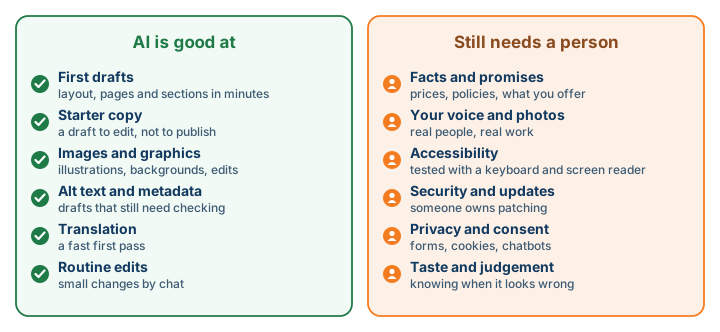
- First drafts, fast. A multi page layout with sensible sections, in minutes rather than weeks. Even if you throw most of it away, it gets you past the blank page.
- Starter copy. A reasonable draft of an about page or a service description that you then rewrite in your own voice. In a 2026 survey of US small business owners by the hosting company Bluehost, only 9% kept the AI's first draft unchanged, which tells you how most people use it.
- Images and graphics. Backgrounds, illustrations and edits to existing photos, generated inside the builder.
- The tedious technical bits. Draft alt text for images, page titles and descriptions, and translations, all of which used to be skipped because they took too long. They still need checking, but drafting them is no longer the bottleneck.
- Routine changes. “Add our new Saturday hours” or “make the contact button bigger”, done by chat in seconds.
What AI cannot do for you
It cannot vouch for what it writes
Language models predict likely words; they do not know your prices, your service area or your refund policy. They will confidently fill gaps with something plausible. On a website, that becomes a promise to customers. A BC tribunal made that point in Moffatt v. Air Canada: the airline was held responsible for wrong fare information its website chatbot gave a customer, and its argument that the chatbot was somehow separate from the airline was rejected. Every fact on an AI drafted site needs a person to confirm it.
It cannot make your site rank on its own
Google is clear that using AI is not a problem in itself. Its guidance, updated in October 2026, says AI can help with research and structure, and tells site owners to fact check and review all AI generated content before publishing, including titles, descriptions, structured data and alt text. What Google does penalise is using any tool to churn out pages that add nothing, such as dozens of near identical “our services in every town” pages. What still wins is what AI cannot invent: first hand experience, real local knowledge and a complete Google Business Profile.
It cannot sound like you, or show your real work
Generated copy tends to sound like everyone else's generated copy, and generated images cannot show your actual team, premises or finished jobs. Those are often the things that persuade a visitor to call you rather than a competitor. Be particularly careful with generated images of people: in BC, using someone's likeness to advertise without consent can be actionable under the Privacy Act, and that includes a lookalike.
It cannot guarantee accessibility
Some builders now run automated accessibility checks, which is a genuine improvement, but no tool can promise that a site works for people who use screen readers, keyboards or magnification. Be wary of accessibility widgets, often called overlays, that claim to fix this automatically. In 2025 the US Federal Trade Commission fined one of the best known vendors US$1 million for claiming its tool made sites compliant. Most BC businesses are not yet covered by a specific website accessibility law, but the duty to accommodate under human rights law already applies, and WCAG 2.2 AA is the standard to build to.
It cannot keep your site secure
AI tools generate code that works, which is not the same as code that is safe. Apps built with AI coding tools have exposed their users' data more than once: in early 2026 one app built on Lovable exposed more than 18,000 user records because its database permissions were never set up properly. In 2025 an AI coding agent on Replit deleted a company's production database during a code freeze.
Attackers are using AI too. In October 2026, researchers documented a criminal using AI agents to try to break into more than 1,200 online shops, reaching more than 100 companies, at an estimated cost of about $50 in AI usage per break in. The same month, two critical flaws in PHP, the language behind WordPress and most of the web, put sites at risk even where the site's own code was fine, as we covered in our Black October guide. A website is never finished: someone has to own updates and patching for as long as it is online.
It cannot handle privacy and consent
Contact forms, analytics, newsletter signups and chatbots all collect personal information. In BC, private businesses fall under the Personal Information Protection Act: collect only what you need, get meaningful consent, publish a privacy policy and name a contact for privacy questions. Ask before switching on advertising trackers, use opt in consent for Quebec visitors, and if a chatbot sends conversations to an AI vendor, say so. No AI builder makes those decisions for you.
It cannot tell when something looks wrong
This is the one we learned first hand. We rebuilt this website with AI assistance, and it made the work dramatically faster: pages, structured data and redirects that would have taken months took weeks, and existing pages kept their search visibility. But two moments stand out. We had AI build an animated 3D version of our homepage, and it worked perfectly and looked cheap, so we threw it away. Later, a set of subtle animations looked great in testing and was completely invisible on a machine with Windows animation effects turned off, which is a common accessibility setting. The AI did exactly what it was asked both times. It took a person to know the result was wrong.
Who owns the result
One more thing to know before you lean on AI for your brand. The US Copyright Office has said that prompts alone do not make you the author of what an AI produces, and the position in Canada is still unsettled. Practically, that means a purely AI generated logo may be hard to protect, so have a human designer involved in anything you want to register as a trademark.
Which approach fits your business
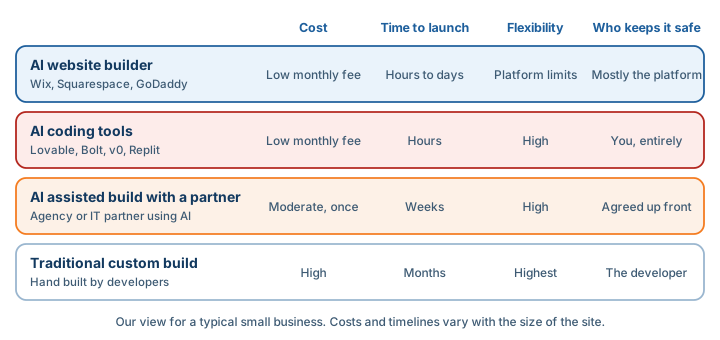
- An AI website builder suits a small business that needs a straightforward brochure site and is happy to work within a platform. Use the AI for the draft, then work through the checklist below before you publish.
- AI coding tools suit prototypes, experiments and internal tools. Avoid them for anything public that collects personal data unless someone who understands security reviews it.
- An AI assisted build with a partner suits organizations that want a custom site, an intranet or a portal connected to Microsoft 365, without a traditional custom budget. AI handles the production; experienced people handle the structure, search, accessibility and security.
- A traditional custom build still makes sense for complex applications with heavy integrations, where the cost of getting it wrong is high.
Before you launch an AI built site
Whichever route you take, work through this list before the site goes live.
- Read every page and check every fact: prices, hours, services, policies and anything that sounds like a promise. Check the page titles, descriptions and alt text too.
- Replace generated stock style images of people with real photos of your team, your premises and your work.
- Test accessibility yourself: move through every page with only the keyboard, run a free checker, and try a screen reader. Aim for WCAG 2.2 AA, and do not rely on an accessibility widget.
- Collect only what each form needs, publish a privacy policy that names your privacy contact, and say where form and chat data goes, including any AI or chatbot vendor.
- Ask before turning on advertising or tracking cookies, and use opt in consent if you serve customers in Quebec.
- If the site has a chatbot, limit what it can see and answer, and test it with awkward questions. You are responsible for what it tells customers.
- If code was generated, have someone check that secret keys are not in the browser and that the database only lets each user see their own records.
- Decide who installs updates and patches, who takes backups, and who renews the domain, and write it down.
- Make sure the domain, the hosting account and the site builder account are in the business’s name, with MFA on each.
- Set up Google Search Console and a complete Google Business Profile before you launch.
How Regroove helps
Our websites and portals service works in three ways: we build the site for you, we build it with your team, or we coach your team to build it themselves with the right prompts and oversight. In every case AI speeds up the production and people own the decisions about structure, search, accessibility and security. For organizations already on Microsoft 365, that can include intranets on SharePoint and portals connected to Power Platform. If you are thinking about AI more broadly, our AI integration services are a good next step.
Frequently asked questions
Can AI build a whole website for a small business?
It can build a good first draft in minutes. Every major website builder now generates a multi page site with layout, copy and images from a prompt. What it cannot do on its own is make sure the content is accurate, the site is accessible and secure, your customers’ data is handled properly, and the result actually looks and sounds like your business. That part still needs a person.
Will Google penalise a website written with AI?
Not because AI was used. Google says AI generated content is fine if it is helpful and accurate, and since October 2026 its guidance tells site owners to fact check and review all AI generated content, including titles, descriptions and alt text, before publishing. What Google penalises is mass producing pages to manipulate rankings, whatever tool produced them.
Do AI website builders make my site accessible?
Not automatically. Some builders now include accessibility checks, which help, but no tool guarantees that a site meets WCAG. Accessibility widgets that claim to make a site compliant are not a fix either; in 2025 the US Federal Trade Commission fined one of the best known vendors US$1 million over that claim. Test with a keyboard and a screen reader.
Is it safe to build a website with AI coding tools like Lovable or Bolt?
For a prototype or an internal experiment, yes. For a site that collects customer data, only if someone who understands security reviews it. Several apps built with these tools in 2025 and 2026 exposed their users’ data because database permissions were never set up properly, and the tools generate working code, not necessarily safe code.
Who is responsible if my website chatbot gives a customer wrong information?
You are. In Moffatt v. Air Canada, a BC tribunal held Air Canada responsible for wrong fare information its website chatbot gave a customer, and rejected the argument that the chatbot was separate from the airline. Treat a chatbot like a member of staff who speaks for you.
Sources
- Google Search Central: using generative AI content
- Google Search Central: spam policies, including scaled content abuse
- Google Search Central: guide to AI features in Search
- W3C: Web Content Accessibility Guidelines 2.2
- Government of BC: accessibility standards
- Government of Canada: Accessible Canada Act regulations
- US FTC: final order requiring accessiBe to pay $1 million
- Overlay Fact Sheet
- Lovable: response to the April 2026 incident
- The Register: Lovable app exposed 18,000 users
- Fortune: Replit AI agent deleted a production database
- The Next Web: AI agents used to break into more than 100 company websites
- Tenable: PHP2Shell frequently asked questions
- Office of the Information and Privacy Commissioner for BC: guidance for businesses
- Office of the Privacy Commissioner of Canada: online tracking and advertising
- Moffatt v. Air Canada, 2024 BCCRT 149
- US Copyright Office: copyright and artificial intelligence, part 2
- BC Privacy Act
- Statistics Canada: AI use by businesses, second quarter of 2026
- Bluehost: AI website builder report
 Author: Helio Pereira