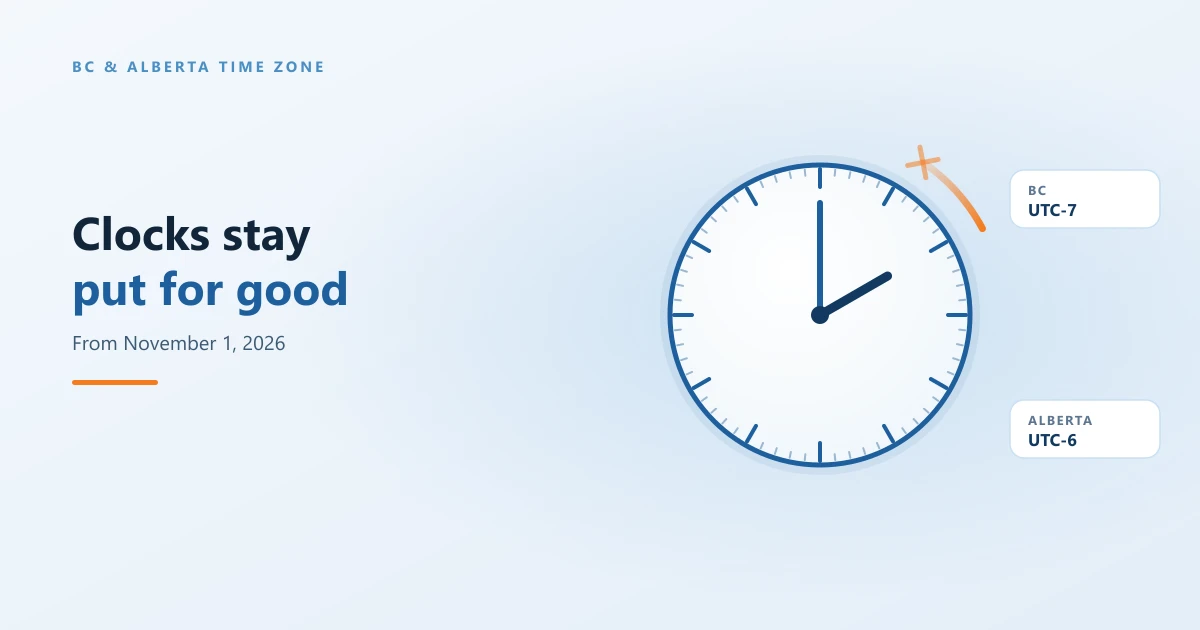
- BC and Alberta stop changing their clocks. On Sunday, November 1, 2026, clocks will not fall back. Most of BC stays on UTC-7 and Alberta stays on UTC-6, all year, permanently.
- Windows needs an update to know this. It is in the October 13, 2026 security update for every supported version of Windows and Windows Server.
- Then the new time zone has to be selected. Look for (UTC-07:00) Pacific Time (British Columbia) or (UTC-06:00) Mountain Time (Alberta).
- Windows is not the only thing with a clock. Firewalls, switches, phone systems, cameras and some business applications keep their own time rules, and some vendors have not released their updates yet.
- Check recurring meetings. Meetings with people in the US Pacific states will move by an hour this winter, and some calendars need a nudge.
- Clients on a support agreement do not need to do anything. We are handling it. Everyone else, we are happy to help.
For as long as most of us have worked in BC, the first Sunday of November meant an extra hour of sleep and a morning spent fixing the clock in the car. This year that hour is not coming. British Columbia and Alberta have both moved to permanent daylight time, and on November 1, 2026 the clocks simply stay where they are.
For people, that is mostly good news. For computers, it is a change to rules that have been built into every operating system, server and network device for decades, and those rules do not update themselves. This is what changed, what it touches, and what you need to do before November 1.
Where this change came from
British Columbia has had the law in place since 2019. The Interpretation Amendment Act was passed that year after a public engagement in which 93% of the 223,000 people who took part supported staying on daylight time all year. The government held off on bringing it into force so that BC would stay in step with Washington, Oregon and California. On March 2, 2026, Premier David Eby announced that BC would go ahead on its own, citing recent actions in the United States. Clocks moved forward on March 8, 2026 for the last time.
The province now calls its time Pacific time, or PCT, which replaces PST and PDT. It is seven hours behind UTC, the same offset BC has been on since March.
Alberta followed later in the year. Albertans narrowly voted against permanent daylight time in a 2021 referendum, but in 2026 the province passed its Official Time Act and will stay on UTC-6 year round from November 1. Microsoft's Alberta change also covers Yellowknife and Inuvik in the Northwest Territories. Manitoba has made the same decision at UTC-5, which matters if you work with offices in Winnipeg.
There are local exceptions in BC worth knowing about if you have staff or sites there:
- Northeastern BC, including Dawson Creek, Fort St. John and Fort Nelson, was already on UTC-7 all year and does not change.
- The East Kootenay, including Cranbrook, Fernie, Invermere and Kimberley, follows Alberta and stays on UTC-6 all year. Those locations should use the Alberta time zone, not the BC one.
- Golden makes one final change on November 1 and then stays on UTC-7.
Is it temporary or permanent?
Permanent. Both provinces describe it that way, and Microsoft's own guidance says BC “will permanently shift” to UTC-7. It is not a pilot and there is no end date. Going back would take new legislation.
What is not settled is what the United States does. Washington, Oregon and California have not stopped changing their clocks, which is where most of the day to day impact comes from.
What actually changes
Any clock that still follows the old rules will be an hour wrong from November 1. A Windows computer set to (UTC-08:00) Pacific Time (US & Canada) will fall back to UTC-8 at 2:00 a.m. that Sunday, because that zone still describes Seattle and Los Angeles. So will any device with the old daylight saving rule typed into it.
The relationship with the US changes every winter. Vancouver and Seattle used to share a clock all year. From November until March, BC will be one hour ahead of the US Pacific states, and Alberta one hour ahead of Montana and Colorado. Then in March, when the US springs forward, the clocks line up again.
In practice, that shows up in a few places:
- Meetings. A recurring call with a supplier in Seattle will move by an hour on your calendar this winter. That is correct. Recurring meetings created before the change are where calendars most often get it wrong.
- Scheduled work. Backups, maintenance windows, patching schedules, report runs and anything else that fires at a set local time.
- Time stamped records. Logs, camera footage, door access records, time clocks and payroll, where an hour out matters long after the fact.
- Customer facing hours. Booking systems, phone system business hours and auto attendants that open and close at a set time.
What it depends on: Windows updates
Windows keeps its time zone rules in the operating system, so the fix arrives through Windows Update. Microsoft added two new time zones for this change: (UTC-07:00) Pacific Time (British Columbia) and (UTC-06:00) Mountain Time (Alberta).
| Windows version | Update that adds the new time zones |
|---|---|
| Windows 11, versions 24H2 and 25H2 | September 22, 2026 preview (KB5124010), and the October 13, 2026 security update |
| Windows 11, version 23H2 | October 13, 2026 security update (KB5126653) |
| Windows 10 with Extended Security Updates, and Enterprise LTSC 2021 | October 13, 2026 security update (KB5126657) |
| Windows Server 2025 | October 13, 2026 security update (KB5126646) |
| Windows Server 2022 | October 13, 2026 security update (KB5126655) |
| Windows Server 2019 | October 13, 2026 security update (KB5126651) |
| Windows Server 2016 | October 13, 2026 security update (KB5126868) |
Three things catch people out here.
Installing the update is only half of it. The update makes the new time zone available. A computer only moves onto it by itself if Set time zone automatically is turned on and location services are working. Everywhere else, the zone has to be selected, either by hand or centrally. For administrators, the PowerShell commands are Set-TimeZone -Id "British Columbia Standard Time" and Set-TimeZone -Id "Alberta Standard Time", which can be pushed through Intune or a script.
Unsupported Windows gets nothing. Windows 10 without Extended Security Updates, and older servers out of support, will not receive the new zones. For those, Microsoft's interim guidance is to use (UTC-07:00) Yukon in BC and (UTC-06:00) Saskatchewan in Alberta, which give the right time from November 1 under a different name.
Domain sign in is not at risk. Windows synchronises time across a network in UTC, and the time zone only changes how that time is displayed. A computer on the wrong zone shows the wrong hour, but it will not suddenly be locked out of the domain.
Applications, conflicts and compatibility
Whether an application handles the change depends on where it gets its time zone rules from.
- Applications that ask Windows pick up the change once Windows is updated. Microsoft confirms that SQL Server on Windows, for example, needs the Windows update and no separate SQL Server patch.
- Applications that carry their own time zone data need their own update. That includes software built on Java, many web applications and JavaScript libraries, and anything running on Linux, which uses the public time zone database (the BC rules arrived in its 2026b release and Alberta's in 2026c).
- Cloud services with a fixed setting can be awkward. An Azure SQL Managed Instance, for example, has its time zone chosen when it is created and cannot simply be changed afterwards.
- Line of business systems, such as payroll, time clocks, booking platforms, practice management and ERP, vary widely, and this is where we expect most of the stragglers.
Some applications are still waiting on their vendor. Not every software company has released an update that recognises the new time zones, and a few have not said when they will. Until they do, an application may not list the new zone at all, or may keep showing the old abbreviation. If something you rely on is in that position, the questions to ask the vendor are simple: does your product use the Windows time zone or its own, have you released support for the BC and Alberta changes, and what should we set in the meantime?
Outlook has its own step. Microsoft asks users to set their Outlook calendar time zone to the new zone as well, and to check recurring meetings that continue past November 1. Only the organizer can change a meeting with attendees, and changing the time zone of a recurring series resets any occurrences you had moved, so those need recreating afterwards. There are also user reports that New Outlook for Mac and Outlook for iOS show Alberta events after November 1 an hour late. Microsoft had not published a fix at the time of writing.
What needs it: servers and workstations only, or everything?
Everything that keeps local time, but not everything is equally urgent. The rule of thumb is simple: if a device makes decisions based on the local time, or records the local time somewhere that matters, it needs attention.
| Device | Needs it? | What to do |
|---|---|---|
| Workstations and laptops | Yes | Install the October update and select the new time zone |
| Windows servers | Yes | Same as workstations, then check scheduled tasks, backups and jobs |
| Linux servers and appliances | Yes | Update the time zone package (tzdata), and any application that bundles its own |
| Phones and tablets | Yes | Keep iOS and Android up to date; they update their own time zone data |
| Firewalls | Yes, if they use local time | Check the time zone and any time based rules, VPN schedules or after hours policies |
| Switches and wireless controllers | Usually | Remove the old daylight saving rule, or run them on UTC |
| Cameras, recorders and door access | Yes | Correct the time zone so recorded times stay accurate |
| Phone systems | Yes | Check the time zone behind business hours, holidays and auto attendants |
| Printers and other devices | Rarely urgent | Fix when convenient; the time shown on them rarely matters |
Network equipment deserves a special mention, because it is the easiest to forget. Most switches and firewalls do not get their time zone from Windows. Many were set up with a fixed offset and a daylight saving rule that says “fall back on the first Sunday of November”, and that rule will do exactly what it says unless someone removes it. Our preference is to run network equipment on UTC, which keeps logs consistent across sites and borders and makes this kind of change irrelevant. Where a device has schedules that must follow the local clock, set it to a fixed UTC-7 (or UTC-6 in Alberta) with daylight saving turned off.
How to check your time zone in Windows 11
It takes about a minute.
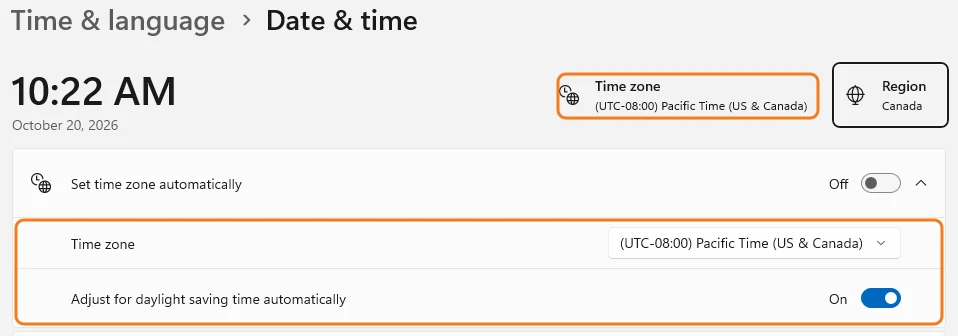
- Right click the clock in the bottom right corner of the taskbar and select Adjust date and time. You can also open Settings and go to Time & language, then Date & time.
- Look at Time zone, both at the top of the page and in the list below it.
- If it says (UTC-08:00) Pacific Time (US & Canada), your computer is still on the old rules and will fall back an hour on November 1.
Changing to the new time zone
- If Set time zone automatically is on, turn it off so you can pick the zone yourself.
- Open the Time zone list.
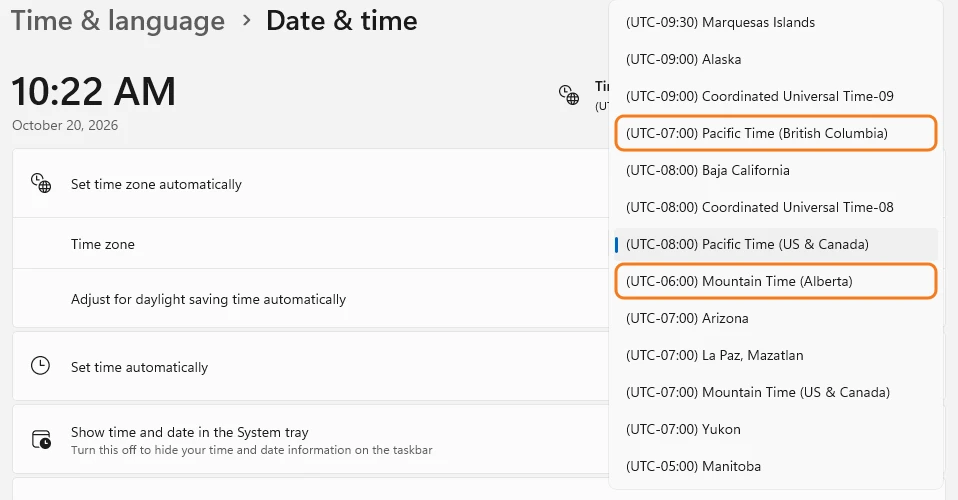
- Select (UTC-07:00) Pacific Time (British Columbia) for most of BC, or (UTC-06:00) Mountain Time (Alberta) for Alberta and the East Kootenay.
One thing that trips people up: Windows does not file the new zones under UTC-07:00 and UTC-06:00 where you would expect. The BC zone appears just above the UTC-08:00 entries, and the Alberta zone just below them, near the old Pacific Time (US & Canada). If you cannot see them in the list at all, the October update has not been installed yet.
If the new time zone causes a problem, switch back
If an application misbehaves after you change zones, you can switch back while you wait for a fix. Which zone you switch back to depends on the date.
| Before November 1, 2026 | From November 1, 2026 | |
|---|---|---|
| British Columbia | (UTC-08:00) Pacific Time (US & Canada) | (UTC-07:00) Yukon |
| Alberta | (UTC-07:00) Mountain Time (US & Canada) | (UTC-06:00) Saskatchewan |
Until November 1, the old Pacific Time (US & Canada) zone shows exactly the same time as the new one, so it is a safe way back. From November 1 it is not: that zone falls back to UTC-8 with Seattle, and your clock will be an hour slow. After that date, use Yukon, which Microsoft recommends as the stand in for BC because it stays on UTC-7. The same logic applies in Alberta with Saskatchewan.
On a Mac, the setting is under System Settings, then General, then Date & Time. Keep macOS up to date so it has the new rules.
What happened when we switched
We moved our own computers to the new Pacific Time (British Columbia) zone about two weeks ago, well ahead of the deadline, precisely so we would find the rough edges before our clients did. We found one quickly: scheduled Teams meetings stopped showing on the Teams calendar. The meetings had not been cancelled, they simply were not appearing.
This week the calendar has been showing them normally again, and we have not had to change anything else. We are still keeping an eye on it. If it happens to you after switching, join from the meeting invitation in Outlook in the meantime, and let us know so we can check whether it is the same issue.
We are taking care of this for our clients
If your organization has a support agreement with us, you do not need to do anything. We are rolling out the October updates, moving managed computers and servers onto the right time zone, checking firewalls, switches and other network equipment, reviewing scheduled jobs and backups, and following up with software vendors whose updates are still pending. If anything needs your input, we will contact you.
If you are not on an agreement and want a hand, we are happy to help, whether that is a quick check of a few computers or a full review before November 1. Our managed IT services cover exactly this kind of change, and existing clients can always request support directly.
Frequently asked questions
Is the BC time zone change permanent?
Yes. British Columbia made its last clock change on March 8, 2026, and clocks will not go back on November 1, 2026. From then on most of the province stays on Pacific time (PCT), which is UTC-7, all year. Alberta has done the same at UTC-6. Neither change is a trial, and reversing either one would need new provincial legislation.
Do I need a Windows update for the new time zone?
Yes. Windows only knows about the new rules after an update. Windows 11 versions 24H2 and 25H2 received it in the September 22, 2026 preview update, and every supported version of Windows and Windows Server received it in the October 13, 2026 security update. Without it, a computer will move its clock back an hour on November 1 and show the wrong time.
Will my computer switch to the new time zone automatically?
Only if Set time zone automatically is turned on in Windows and location services are available. Otherwise someone has to select the new zone by hand: (UTC-07:00) Pacific Time (British Columbia) for most of BC, or (UTC-06:00) Mountain Time (Alberta) for Alberta. Installing the update makes the new zone available. It does not, on its own, move every computer onto it.
What time zone should I choose in BC after November 1 if the new one causes problems?
Choose (UTC-07:00) Yukon. It is the stand in Microsoft recommends, and it gives the correct UTC-7 time all winter. Do not go back to (UTC-08:00) Pacific Time (US & Canada) after November 1, because that zone still falls back an hour and your clock will be wrong. In Alberta, the equivalent stand in is (UTC-06:00) Saskatchewan.
Do switches, firewalls and other network devices need changing?
Usually, yes. Most network devices do not get time zone updates from Windows. Many have a fixed offset with a daylight saving rule typed in by whoever set them up, and that rule will fall back an hour on November 1 unless it is changed. The cleanest fix is to run network equipment on UTC. If a device has schedules that must follow local time, such as after hours firewall rules, set it to a fixed UTC-7 (or UTC-6 in Alberta) with daylight saving turned off.
Why will my meetings with people in Seattle or California move?
Because those states are still changing their clocks. Until now, Vancouver and Seattle were always on the same time. From November 1, BC stays at UTC-7 while Washington, Oregon and California fall back to UTC-8, so all winter BC is one hour ahead of them. A 9:00 meeting set by someone in Seattle will show as 10:00 for you. That is correct, not a bug.
Questions about your own setup? Get in touch and we will take a look with you.
 Author: Elian Figueiredo